Filtering Carts Pro
When you have hundreds of carts, the status views are not enough. Click Filters above the cart list to narrow it down.
Filtering needs Pro. The free plugin has the status views and cart ID search.
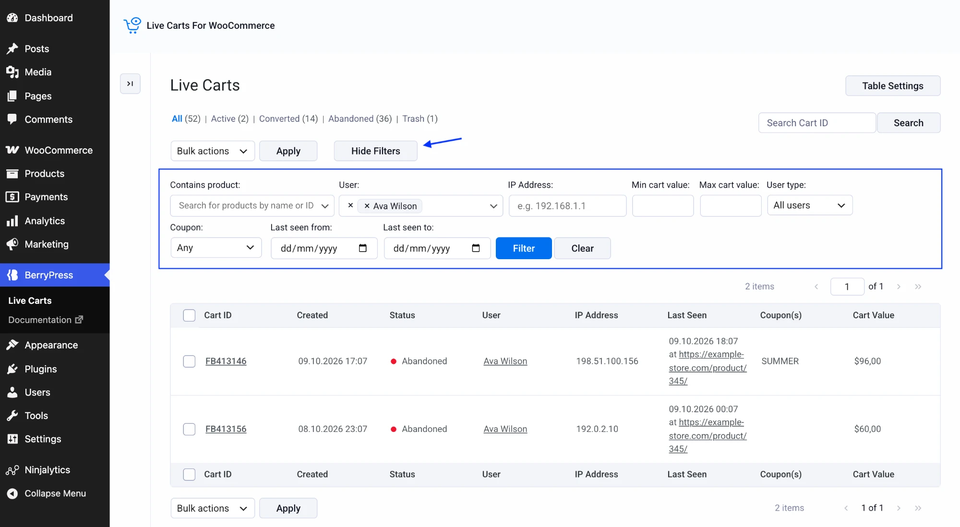
Available filters
| Filter | Finds carts that... |
|---|---|
| Contains product | include one or more products you pick |
| User | belong to the customers you pick |
| IP Address | were created from a given IP |
| Min cart value / Max cart value | are worth at least, or at most, an amount |
| User type | belong to logged-in customers only, or guests only |
| Coupon | have a coupon applied (With coupon) or don't (Without coupon) |
| Last seen from / to | were last active in a date range |
Fill in one or several fields, then click Filter. Use Clear to start over. Filters work together with the status views, so you can show Abandoned carts only, then filter them.
Ideas
- Follow up on valuable carts. Abandoned + Min cart value 100.
- Check a product problem. Filter by a product that you suspect has a checkout issue.
- Look after your regulars. Filter by a customer.
- Understand coupon use. Compare With coupon and Without coupon.