Cart Details
Click a cart ID in the cart list to see everything about that cart. To move on to the next one, use the pagination (Previous cart / Next cart) instead of going back to the list.
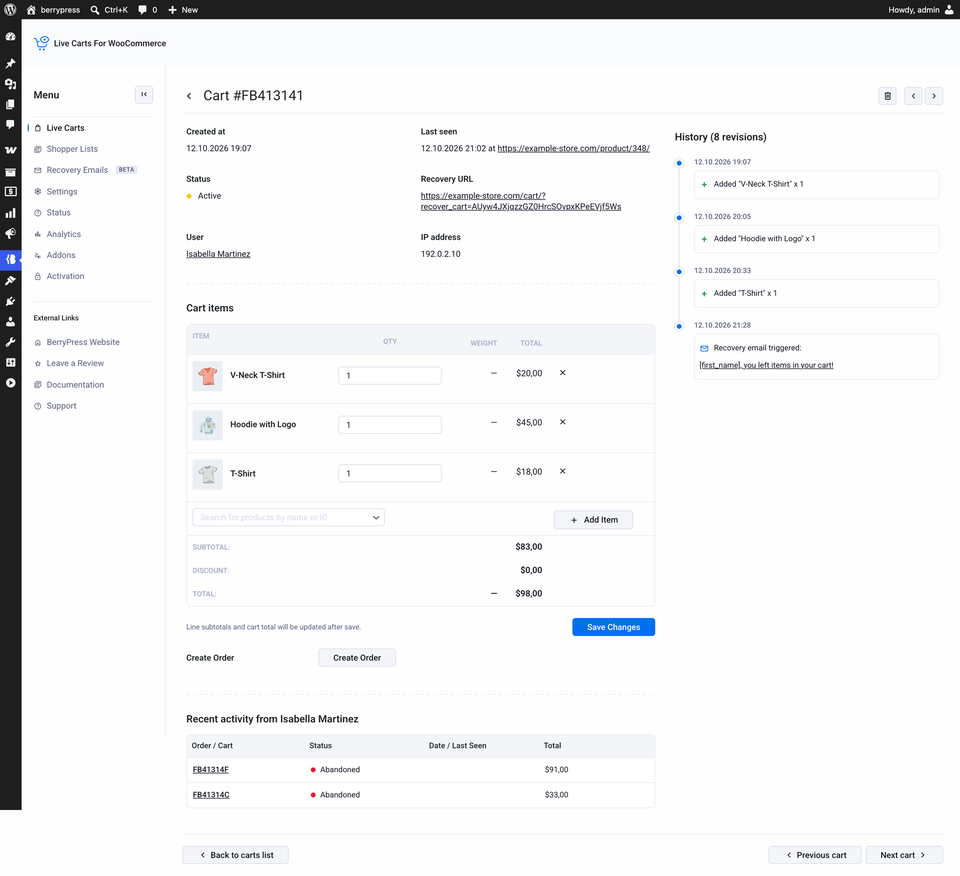
The information panel
- Created at and Last seen
- Status
- User and Email (see Cart emails)
- IP address and Last URL, when collection is on
- Order, once the cart is converted. It links to the WooCommerce order.
- Recovery URL, a link that restores this cart for the shopper. See Recovery URL.
The products
The table lists each product with its thumbnail, name, attributes and variation, quantity, and price, plus any coupons and the discount they gave.
With Pro, the table also shows product meta from other plugins, for example custom fields from a product add-on plugin. Pro
Pro can also show product weight, if you switch it on Pro, and lets you edit the cart Pro.
History
Each cart keeps a log of what changed and when:
History (3 revisions)
Added "Beanie" (quantity: 1)
Changed quantity of "T-Shirt" from 1 to 2
Removed "Hoodie"
To keep the database light, history is stored for the 100 most recently seen carts. You can change that limit, or turn history off, in Tracking settings Pro.
Recent activity
If the cart belongs to a logged-in customer, a sidebar shows their recent orders and carts. This is handy when you are deciding how to help them.
You can hide it: Settings → Tracking → Cart details → Show recent orders on the cart detail page.
Actions
- Trash or Restore the cart
- Previous cart / Next cart
- Create Order Pro, see Create an order from a cart