Shopper Lists
WooCommerce 10.9 added Wishlist and Save for Later lists for customers. Live Carts lets you see them in the admin, the same way you see carts. It does not add wishlist buttons to your store. It only shows the lists that WooCommerce already stores, once you turn those features on.
What you need
- WooCommerce 10.9 or newer.
- Live Carts 1.3.0 or newer.
- At least one list feature turned on: go to WooCommerce → Settings → Advanced → Features and enable Wishlist and/or Save for Later.
WooCommerce's Shopper Lists are currently experimental and need blocks (Gutenberg). Only logged-in customers have lists, so only their lists are tracked.
If the features are off, the Shopper Lists screen tells you so, with a link to the setting.
Using it
Open BerryPress → Live Carts → Shopper Lists.
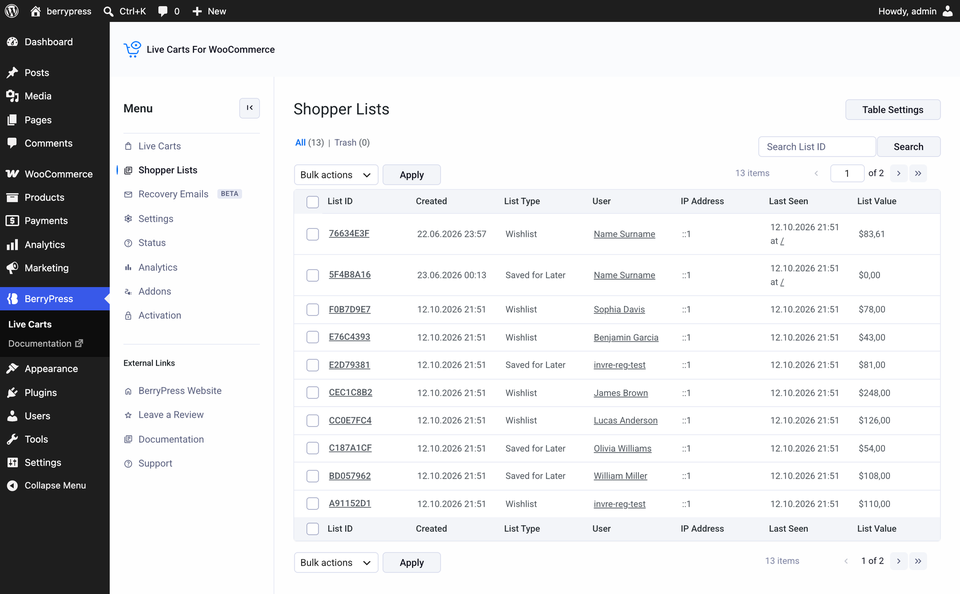
It works like the cart list: search by list ID, open a list to see its products, trash and restore lists. The columns include List Type (Wishlist or Save for Later), User, List Value and Last Seen.
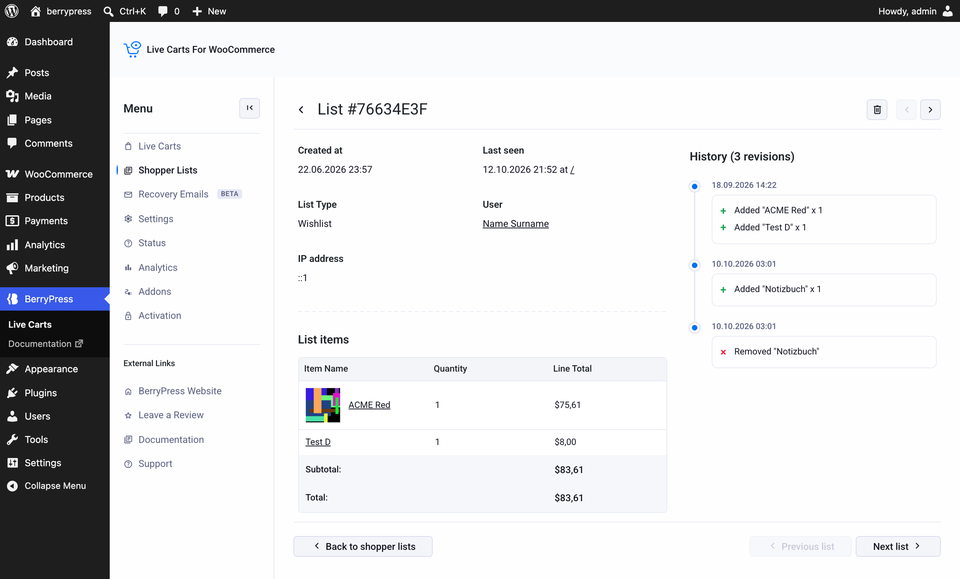
Lists are saved when a logged-in customer changes them in WooCommerce and when they log in. If the screen is empty, check the three requirements above and have a logged-in customer create a list on your storefront.
The Filters button (Pro) applies to the cart list only. Shopper lists are not abandoned or converted. They are separate from carts. Recovery emails for shopper lists are coming soon; please contact us if that's essential for your store.