Live Carts for WooCommerce
- Free plugin: WordPress.org · Support forum
- Pro add-on: berrypress.com or the WooCommerce Marketplace · Support
- Changelogs: Free plugin · Pro add-on
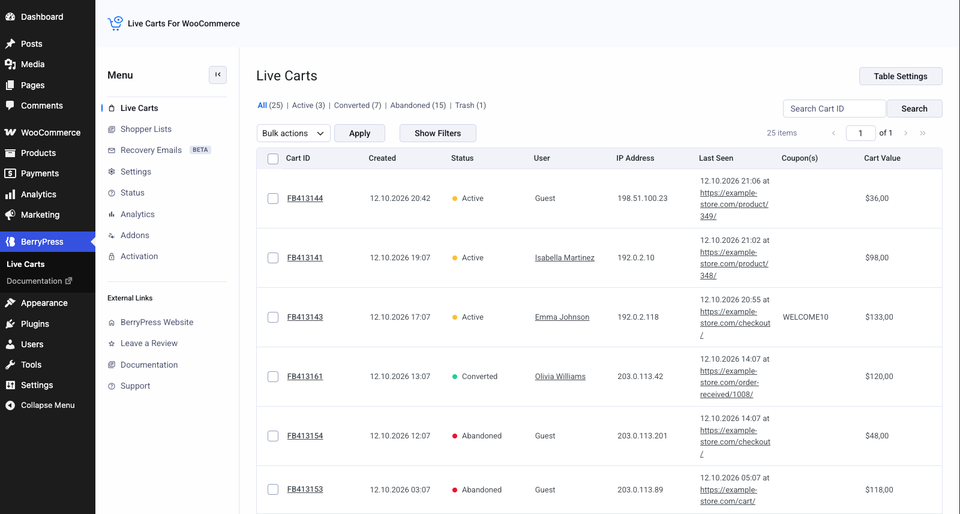
Live Carts shows you what is happening in your customers' carts, as it happens. Every cart that is created in your store appears in your WordPress admin with its products, its value, who it belongs to and whether the customer is still shopping, walked away, or bought.
Then it helps you do something about the carts that were left behind: it can email the shopper a reminder with a one-click link that puts their items back in the cart.
What you can do with it
- Watch carts live. Items added, removed or changed show up straight away. How tracking works
- Spot abandoned carts. A cart with no activity for a while is marked as abandoned. Cart statuses
- Help a customer. Ask them for their cart ID and look their cart up in seconds. Cart ID for support
- Win carts back. Send automatic recovery emails with a link that restores the cart. Recovery emails
- Measure it. Conversion rate, abandonment rate and average cart value in WooCommerce Analytics. Analytics
Free and Pro
The free plugin is a complete cart tracker and a recovery email tool. Pro adds the hands-on tools: editing a cart for a customer, turning it into an order, and finer control over what is tracked.
| Free | Pro | |
|---|---|---|
| Real-time cart tracking, statuses, search, bulk actions | ✅ | ✅ |
| Cart details, revision history, trash and restore | ✅ | ✅ |
| Shopper Lists (Wishlist / Save for Later) tracking | ✅ | ✅ |
| Visitor email tracking | ✅ | ✅ |
| Recovery emails and recovery links | ✅ | ✅ |
Cart ID on the storefront and [berrypress_live_cart_id] shortcode | ✅ | ✅ |
| Analytics → Carts | ✅ | ✅ |
| Discount coupon in recovery emails | ✅ | |
| Edit a cart from the admin | ✅ | |
| Product meta in cart details | ✅ | |
| Create an order from a cart | ✅ | |
| Advanced cart filters | ✅ | |
| Custom abandoned / archive timing | ✅ | |
| Exclude user roles from tracking | ✅ | |
| Revision history controls | ✅ | |
| Custom client IP header | ✅ | |
| Product weight in cart details | ✅ |
Anything that needs Pro is marked with a Pro badge throughout this documentation, and with a Pro label in the sidebar.
Requirements
| Free | Pro | |
|---|---|---|
| WordPress | 6.5+ | 6.8+ |
| PHP | 7.0+ | 7.4+ |
| WooCommerce | 7.0+ | 7.0+ |
| Other | Live Carts for WooCommerce - recent version, installed and active |
Shopper Lists tracking also needs WooCommerce 10.9 or newer. See Shopper Lists.
Where to start
- Install Live Carts (free, takes a minute).
- Follow the Quick Start.
- Want Pro? Get and activate Live Carts Pro.
Ninjalytics adds ready-made Live Carts reports: carts by status, average cart value, and a full cart export. It is free on WordPress.org.