Product Activation
Overview
All BerryPress paid products require activation to unlock Pro features and receive updates. Activation is done through the plugin's admin page in WordPress.
Purchases made on the WooCommerce Marketplace are the exception: they are managed through WooCommerce.com and need no activation here. See the last tab below.
Activation Methods
Choose the tab that matches where you purchased the plugin.
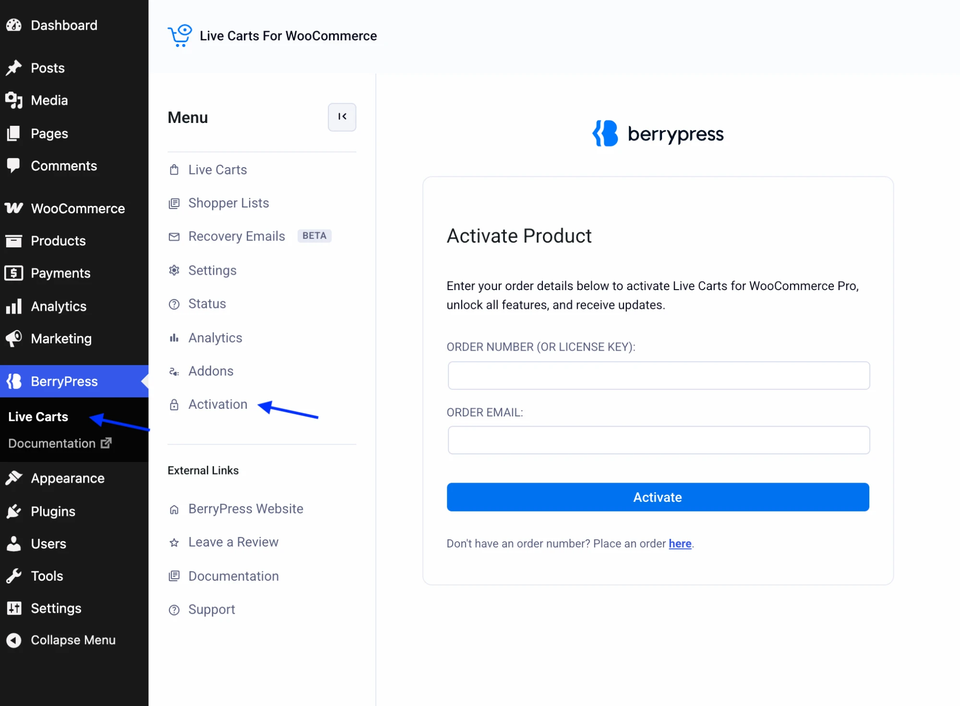
The first two methods use the same screen, BerryPress → [Product Name] → Activation in WordPress admin. Here it is for Live Carts Pro, as an example:
- Bought from BerryPress
- Bought from WP Zone
- Bought on WooCommerce Marketplace
What you need:
- Order ID (also called subscription ID)
- Email address used at checkout
Steps:
- Install and activate the plugin
- Navigate to BerryPress → [Product Name] → Activation in WordPress admin
- Enter your Order ID in the "Order Number" field
- Enter your Order Email
- Click "Activate"
Downloading the plugin ZIP:
- Log in to My Account on berrypress.com
- Open Downloads or Licenses and download the ZIP for your product
- You can also use the download link in your purchase confirmation email
- In WordPress, upload it under Plugins → Add New Plugin → Upload Plugin
Finding your Order ID:
- Check your purchase confirmation email from BerryPress
- Log in to My Account → Orders
- Order ID format:
#BPXXXXXXYXXXXXXXXorBPXXXXXXYXXXXXXXX
You can enter the order ID with or without the # symbol.
What you need:
- WP Zone license key
- Email address (any email works)
Steps:
- Install and activate the plugin
- Navigate to BerryPress → [Product Name] → Activation in WordPress admin
- Enter your WP Zone license key in the "Order Number" field
- Enter any email address
- Click "Activate"
Downloading the plugin ZIP:
- Log in to your WP Zone account and open the Downloads section
- Download the ZIP for the product, then upload it under Plugins → Add New Plugin → Upload Plugin
Finding your WP Zone license key:
- Log in to your WP Zone account
- Navigate to Downloads/Licenses section
- Copy the license key for the product
For WP Zone purchases, only the license key is required. You can enter any email address. The system validates against the license key only, not the email.
Live Carts for WooCommerce Pro is currently the only BerryPress product sold on the WooCommerce Marketplace.
Pro bought on the WooCommerce Marketplace is managed through your WooCommerce.com account, so there is no activation inside the plugin: once it is installed and active, the Pro features are on. The Activation entry used by the other methods isn't there, and that is expected.
Steps:
- Install the plugin as WooCommerce.com describes in Installing extensions.
- Click Activate Plugin on the Plugins screen.
- To receive updates and support, connect your site to your WooCommerce.com account. The Update Manager shows a Connect button if needed. See WooCommerce's guide to managing your subscriptions.
Your licence, renewals and billing are handled by WooCommerce.com. For the full steps, see Get and activate Live Carts Pro.
After Activation
What happens:
- Pro features unlock immediately
- Plugin receives access to updates
- Site is registered to your license
Verify activation:
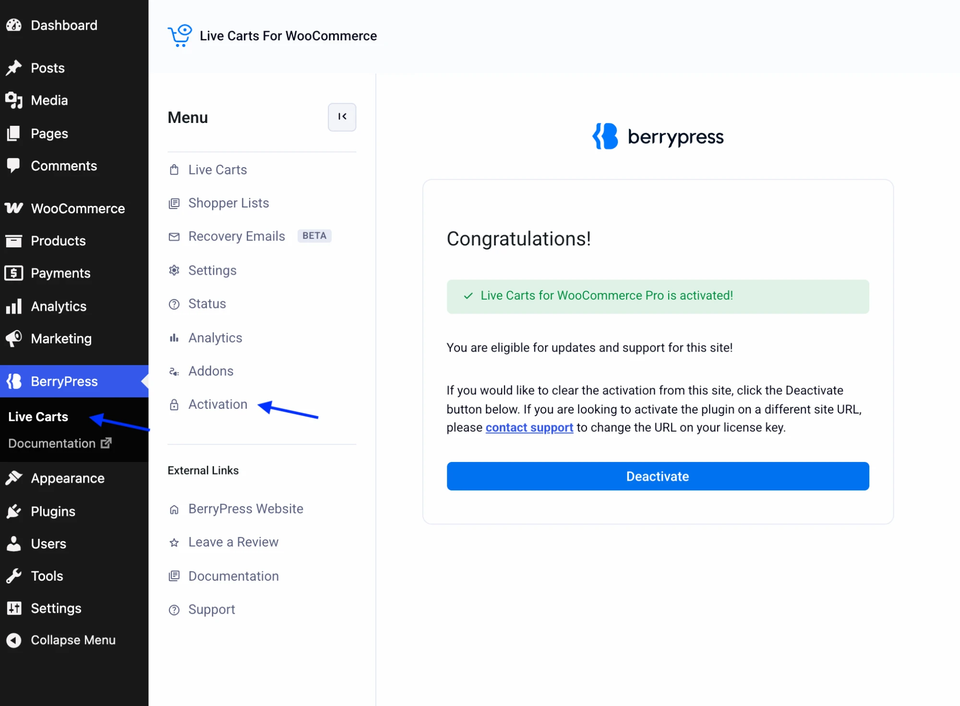
- Look for "Successfully activated" message
- Pro features appear in plugin menu/settings
- Check activation status on the Activation page
Troubleshooting
Invalid order number or email
Error: "Invalid order number or email address"
Solutions:
-
Check Order ID:
- Verify you're using the correct order number
- It doesn't matter which of your orders you use, renewals included
-
Check Email:
- Must match email used at checkout (BerryPress purchases)
- For WP Zone: any email works
-
Verify Purchase:
- Log in to My Account
- Navigate to Subscriptions
- Confirm your subscription exists and is Active (not Expired)
- BerryPress licenses are annual - check the expiry date
- If expired, renew your subscription to reactivate
Maximum activations reached
Error: "You have reached the maximum number of site activations"
What this means:
- Your license tier has a site limit
- All allowed activations are in use
localhost URLs (e.g., http://localhost:8080/) don't count toward your site limit.
Solutions:
Option 1: Deactivate via My Account
- Log in to My Account
- Navigate to Orders
- Click on your initial purchase order
- View list of activated sites
- Click "Deactivate" next to the site URL you want to remove
- Return to new site and activate
Option 2: Contact Support
- Open ticket
- Request deactivation of specific site URL
- Provide: order ID, site URL to deactivate
Option 3: Upgrade License
- Upgrade to higher tier for more sites
- See License Upgrades guide
Activation failed
Error: "Something went wrong during the activation attempt"
Common causes:
- Server connectivity - Site can't make HTTPS requests
- Firewall blocking - Hosting firewall blocks activation server
- Temporary server issue
Solutions:
- Wait 5-10 minutes and try again
- Check with hosting provider about firewall/outgoing HTTPS
- Verify site has internet connectivity
- If persists → Open ticket
Deactivation
Deactivate when:
- Moving site to new domain
- No longer using the plugin on this site
- Testing on staging and moving to production
To free a site on your license, deactivate it in your BerryPress account (My Account → Orders → your order → Deactivate next to the site URL). Currently, deactivating from the plugin's Activation screen alone does not free the slot. We plan to improve this.
FAQs
Q: What if I lost my order number?
A: Check your purchase confirmation email or log in to My Account → Orders
Q: Can I use the same activation on multiple sites?
A: Only within your license tier limits. Single Site = 1 site, Unlimited = unlimited sites.
Note: localhost URLs don't count toward limits.
Q: Do I need to reactivate after plugin updates?
A: No. Activation persists through updates.
Q: What happens if my subscription expires?
A: Pro features continue working, but you won't receive updates. Renew to get updates again.
Q: Can I move activation between staging and production?
A: Yes. Deactivate the staging site in your BerryPress account (My Account → Orders), then activate on production. Or contact support to change the URL.
Q: Does activation work on localhost?
A: Yes, and localhost URLs don't count toward your site limit. No need to deactivate when moving to live site.
Q: I bought from WP Zone. What email should I use?
A: Any email works. System validates against license key only, not email.
Support
Need help with activation?
Open Ticket: help.berrypress.com
Include:
- Product name
- Order ID or WP Zone license key
- Error message (if any)
- Site URL
Response time: 1-2 business days
Related: