How Recovery Emails Work
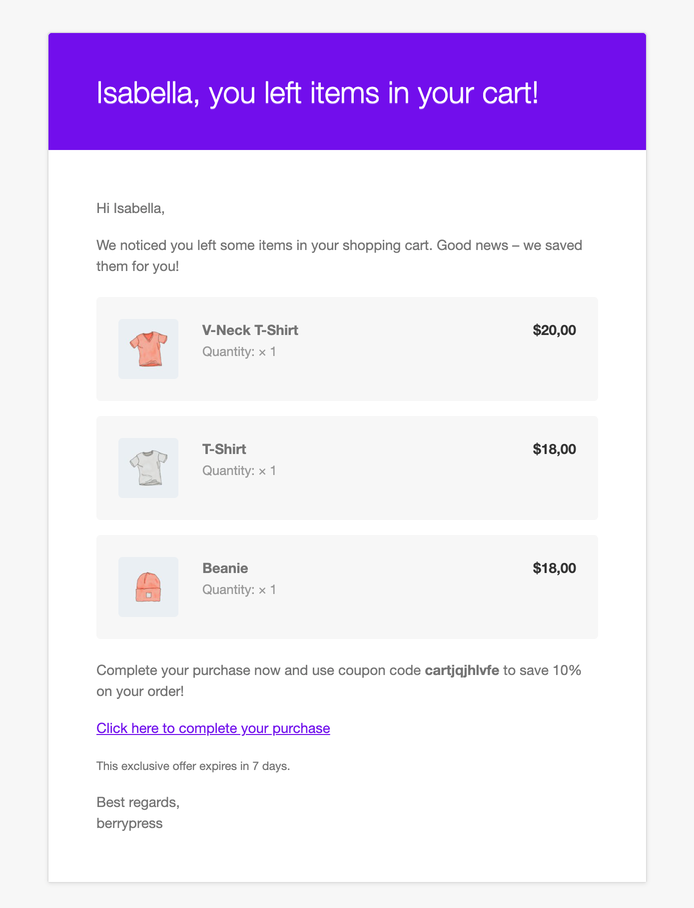
A recovery email is a friendly reminder that goes to a shopper who left items in their cart. It lists what they left and gives them a one-click link back to the cart.
Recovery emails are part of the free plugin. They are currently marked as Beta. Adding a discount coupon to the email needs Pro.
The idea
You write one or more emails ahead of time and say how long after the shopper was last seen each one should go out. Live Carts then does the rest:
- Once an hour, it looks for carts that match each active email's timing.
- For each cart, it checks the rules below.
- It fills in the shortcodes, such as the shopper's name and the cart contents.
- It sends the email and remembers that it did.
Because it runs on WordPress's hourly scheduled tasks, the exact send time can be a little later than the time you set. WP-Cron runs when your site gets visits, so on a quiet site the run can come later, unless you set up a server cron job.
Who receives an email
A cart gets an email only if all of this is true:
- The cart has an email address. See Cart emails.
- The cart is not converted: the shopper hasn't completed checkout with this cart yet.
- The cart is not empty and not in the trash.
- The cart was last seen at least as long ago as the email's Send after time.
- The cart was last seen at most a week longer ago than that. Very old carts are left alone.
- That particular email hasn't been sent to that cart before. No duplicates, ever.
- The shopper hasn't already used a recovery coupon from an earlier email for this cart. Pro
The timing counts from when the shopper was last seen, not from the cart's Abandoned status. An email set to a few minutes can go out before the cart is marked as abandoned.
Shopper Lists are not emailed yet. Recovery emails for them are coming soon; please contact us if that's essential for your store.
What the email looks like
Your message is placed inside your store's standard WooCommerce email template, so it uses your header, footer and colours from WooCommerce → Settings → Emails.
It is sent from the name and address in Email settings, or from your WooCommerce sender details if you leave them empty.
When the shopper clicks the link
The [cart_url] link is the cart's Recovery URL. It restores their items and takes them to the cart page.