Email Shortcodes
Shortcodes are placeholders that Live Carts replaces with real details when it sends the email. Write them with square brackets, exactly as shown. You can use them in the subject and in the message.
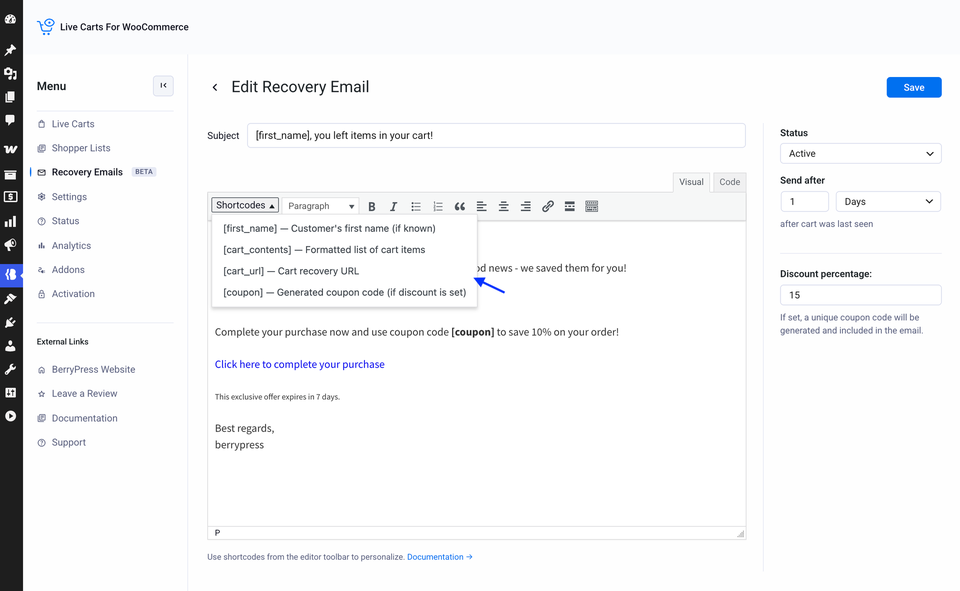
| Shortcode | Becomes |
|---|---|
[first_name] | The customer's first name, when it is known. |
[cart_contents] | A formatted list of the products in the cart, with quantities. |
[cart_url] | The cart's Recovery URL: a link that restores the cart. |
[coupon] Pro | A unique discount code. See Discount coupons. |
Guests may not have a name
Live Carts knows a first name for customers with an account. For a guest, the name might not be known, so write greetings that still read well without it: "Hi there," works for everyone.
Things to check
- Use square brackets
[like_this], not curly ones. - No spaces inside:
[first_name], not[ first_name ]. - Lowercase only.
If a shortcode shows up as plain text in a received email, see Recovery emails not sending.
Developers can add their own shortcodes: see API & Extending → Filters.