Discount Coupons Pro
Give shoppers a small push: each recovery email can include a personal discount code that only works for them.
Coupons in recovery emails need Pro.
How to set it up
-
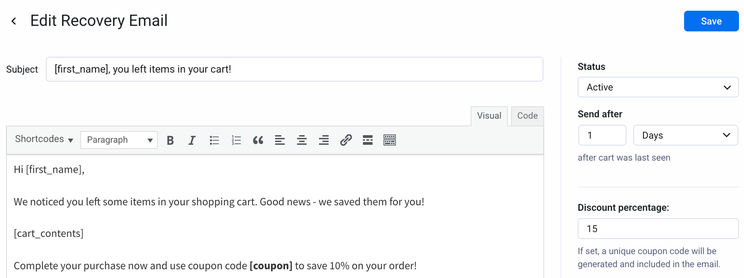
Open or create a recovery email.
-
In Discount percentage, enter a number from 1 to 100. Leave it empty or 0 for no discount.
-
Put the
[coupon]shortcode in the message, for example:Use code [coupon] at checkout to save 10%. -
Save.
You need both the discount percentage set in the email settings and the [coupon] shortcode in the message body. If either is missing, no coupon is created.
What the coupon is like
When the email is sent, Live Carts creates a WooCommerce coupon and puts its code in place of [coupon]:
- A percentage discount, using the number you entered
- Single use
- Valid for 7 days
- Individual use only: it can't be combined with other coupons
- Tied to that one cart
You will find the generated coupons in WooCommerce → Marketing → Coupons. Their codes start with CART.
When the shopper clicks the recovery link in the email, a coupon already on the cart is restored with the cart.
One coupon per cart
If a cart receives several emails that all use [coupon], the shopper keeps the same coupon for that cart. And once they've used a recovery coupon, they are not sent further recovery emails for that cart.