Tracking Settings
BerryPress → Live Carts → Settings → Tracking controls what is recorded about each cart and whose carts are tracked. Remember to click Save after changing anything.
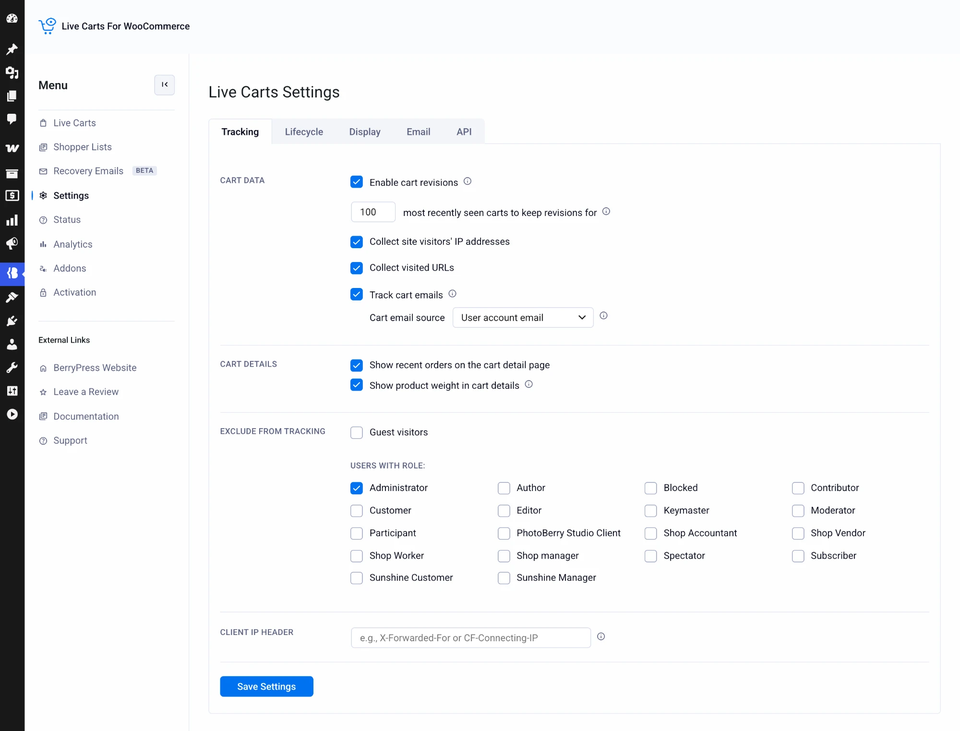
Cart data
| Setting | What it does | Default |
|---|---|---|
| Collect site visitors' IP addresses | Saves the shopper's IP address on the cart. Turn it off for stricter privacy. The IP column disappears from the list. | On |
| Collect visited URLs | Saves the last page the shopper was on. Useful for seeing where they gave up. | On |
| Track cart emails | Saves the email entered at checkout so you can send recovery emails to guests. See Cart emails. | On |
| Cart email source | Which email wins when a logged-in customer also types a different one at checkout. Shown only while Track cart emails is on. | User account email |
| Enable cart revisions Pro | Keeps the history of changes made to each cart. | On |
| …most recently seen carts to keep revisions for Pro | Limits how many carts keep their full history, to keep your database small. 0 keeps history for all carts. | 100 |
In the free plugin, history is always on and limited to the 100 most recently seen carts.
Cart details
| Setting | What it does | Default |
|---|---|---|
| Show recent orders on the cart detail page | Adds the Recent activity sidebar for logged-in customers. | On |
| Show product weight in cart details Pro | Adds the weight of each product to the products table. Handy for shipping decisions. | Off |
Exclude from tracking
Stop tracking carts you don't care about, such as your own test carts.
| Setting | What it does |
|---|---|
| Guest visitors | Tracks logged-in customers only. Visitors who aren't logged in get no cart record. This also means no recovery emails for guests. |
| Users with role Pro | Tick the roles to leave out, for example Administrator and Shop Manager. Their carts are never recorded. |
Existing carts aren't deleted when you change an exclusion. It only affects carts created from then on.
Client IP header Pro
If your site sits behind a proxy, load balancer or CDN, the IP address Live Carts sees might be that of the proxy, not the shopper. Tell it which HTTP header carries the real one:
| Service | Header |
|---|---|
| Cloudflare | CF-Connecting-IP |
| Most proxies and load balancers | X-Forwarded-For |
| Nginx proxies | X-Real-IP |
Leave the field empty to use the server's default. It only matters while IP collection is on.