API Settings
BerryPress → Live Carts → Settings → API switches the REST API and webhooks on or off, and is where you register webhooks. Both need a recent version of Live Carts (free).
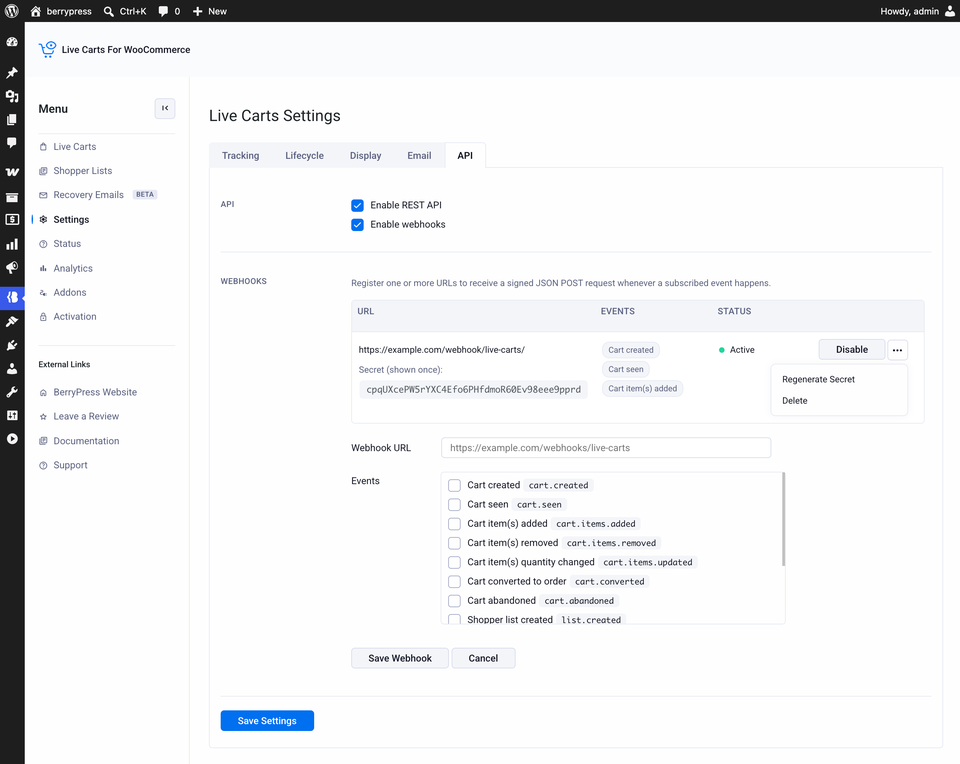
Turning the API on or off
| Setting | What it does |
|---|---|
| Enable REST API | Turns the REST API on or off. |
| Enable webhooks | Turns webhooks on or off. |
Click Save Settings after changing the checkboxes.
Webhooks
Register one or more URLs to receive a signed JSON POST request whenever a subscribed event happens. The list shows each webhook's URL, the events it is subscribed to, and its status.
Add a webhook
- Enter the Webhook URL: the address that should receive the requests.
- Under Events, tick every event the webhook should receive. Each one is listed with its name, for example
cart.created. See the full list of events. - Click Save Webhook. Use Cancel to discard it.
Every request is signed with a secret that Live Carts generates for the webhook. It is shown once, so copy it when you save the webhook. If you lose it, use Regenerate Secret.
cart.seen and list.seen can fire very often. Subscribe to them only if you need them, and keep your receiving endpoint fast.
Manage a webhook
| Action | What it does |
|---|---|
| Disable | Stops the webhook sending requests, without deleting it. |
| Regenerate Secret | In the ••• menu. Creates a new secret. |
| Delete | In the ••• menu. Removes the webhook. |
For the payload each event sends and how deliveries work, see Webhooks.