WooCommerce Forms
BerrySecure → Invisible reCaptcha → WooCommerce protects the forms on the WooCommerce My account page and product reviews. In the Protected forms row, tick the forms you want and save. All options are off by default. A note at the bottom of the tab says that it protects the forms added by WooCommerce.
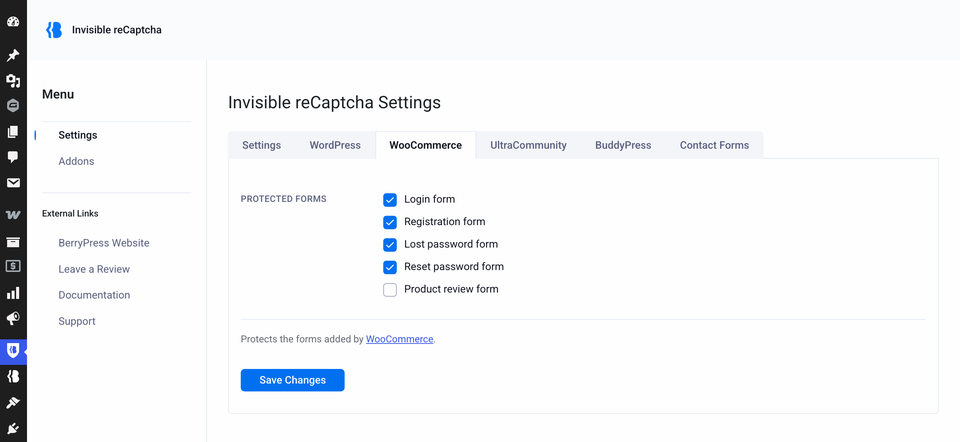
| Setting | Protects | Default |
|---|---|---|
| Login form | The WooCommerce login form. | Off |
| Registration form | The WooCommerce registration form. | Off |
| Lost password form | The WooCommerce lost password form. | Off |
| Reset password form | The form where customers choose a new password. | Off |
| Product review form | The product review form. | Off |
The checkout is not protected
The checkout page has no reCAPTCHA. That includes creating an account while checking out. Only the forms in the table above are protected.
WooCommerce and WordPress settings
The WooCommerce login and the WordPress login are separate forms, with separate settings. Turn on both if customers can use both. See WordPress Forms.
Product reviews
Reviews are comments with a star rating on a product.
- Only submissions with a rating on a product are treated as reviews.
- A review that fails the check is not saved. The customer is sent back to the product page.
- If Comments protection in the WordPress tab is also on, the review form still shows a single reCAPTCHA.
Reset password
If the check fails on the reset password form, the visitor is sent to the home page and the password is not changed.