Most WooCommerce stores are flying blind. You can see every completed order in detail, but all the browsing that happened before is invisible. Customers add products, change their minds, come back later, abandon their cart, and sometimes return weeks later to finish the purchase.
That missing data matters more than most store owners realise. Cart abandonment is one of the biggest sources of lost revenue in e-commerce, and without visibility into what is actually happening, you’re left guessing at why your conversion rate looks the way it does.
Live Carts for WooCommerce changes that. It gives you a clear, real-time view of every cart in your store, so you can stop guessing and start acting on what is actually happening.
Why Real-Time Cart Tracking Matters
Better customer support
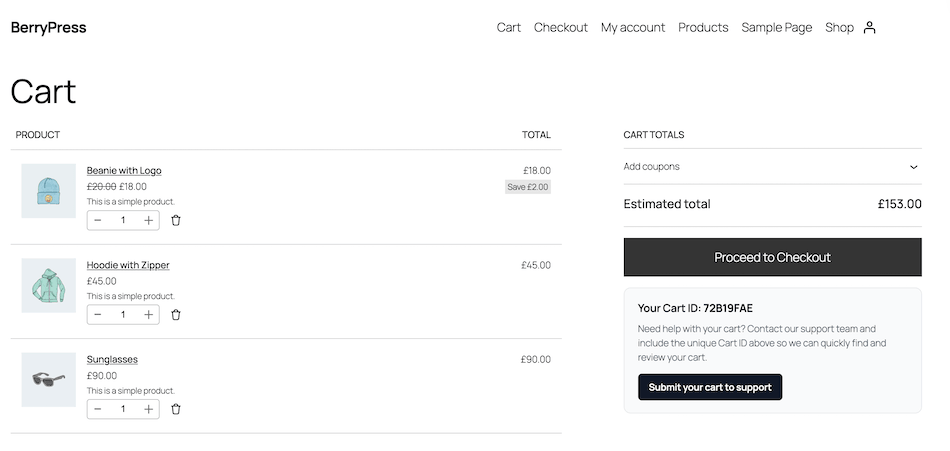
When a customer reaches out about a problem with their cart, your support team usually has no easy way to see what is actually in it. With Live Carts, every visitor has a unique cart ID that can be looked up in the admin. Support agents can see exactly what is in the cart, when it was last updated, and which page the customer was on – and help in seconds instead of working through a string of follow-up questions.
You can search the cart list by cart ID and bulk delete old carts directly from the table. You can optionally display the cart ID on the frontend using the [berrypress_live_cart_id] shortcode so customers can share it with your support team from the cart or checkout page.
Fewer abandoned carts
Cart abandonment is one of the biggest sources of lost revenue in e-commerce. If you do not measure it, you cannot improve it.
Live Carts shows you which carts went cold, when, and at what value. With that data, you can spot patterns, identify the products and checkout flows losing most sales, and start doing something about it.
Why We Built It
Live Carts started as a tool for one of our client projects, where the support team needed a way to identify customer carts during chat conversations. WooCommerce stores all of that data internally, but there was no admin-friendly way to see it.
So we built one – first for ourselves, then for everyone. Since then, it’s become clear that many store owners face the same challenge. Live Carts was designed to remove the guesswork, make cart data accessible, and give support and marketing teams the tools they need to act on it.
What You Get in the Free Version
The free version of Live Carts is built around one core idea: you should never lose visibility into what is happening in your store’s carts.
See every cart, as it happens
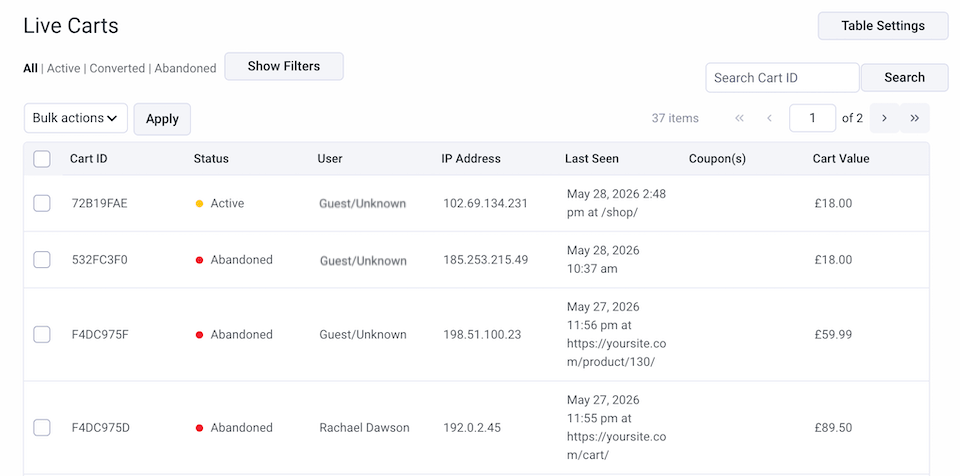
The cart list shows active, abandoned, and converted carts in real time, with status indicators and total value. You can see the logged-in user, IP address, and the last URL each cart was seen on. IP and URL collection can be disabled for privacy if needed.
Full cart details on demand
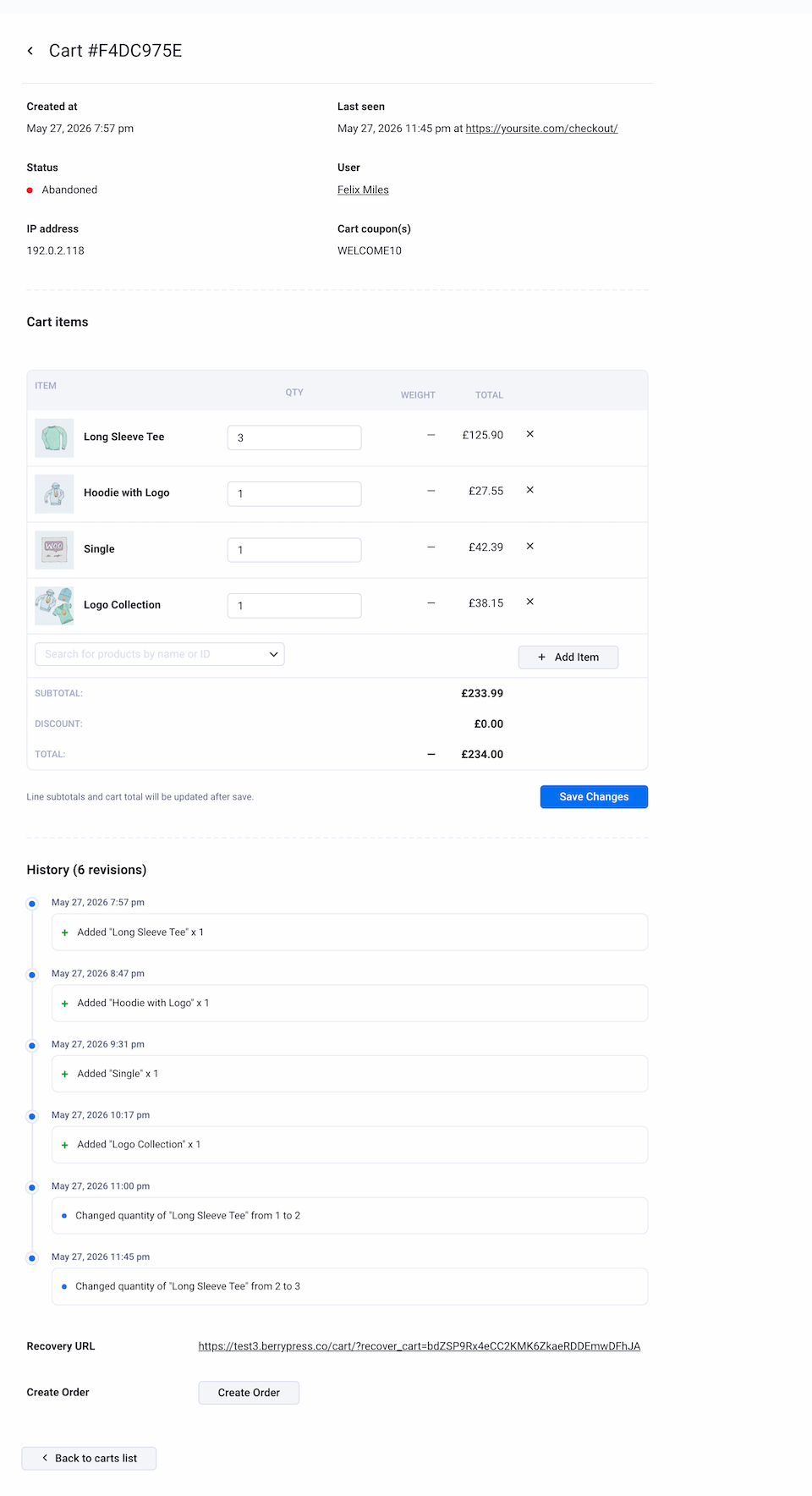
Click a cart ID to see all products with thumbnails, attributes, quantities, applied coupons, and total cart value. Discounts are shown separately so the numbers are always clear. A revision history shows how the cart changed over time – items added, removed, or quantities updated.
Built-in analytics
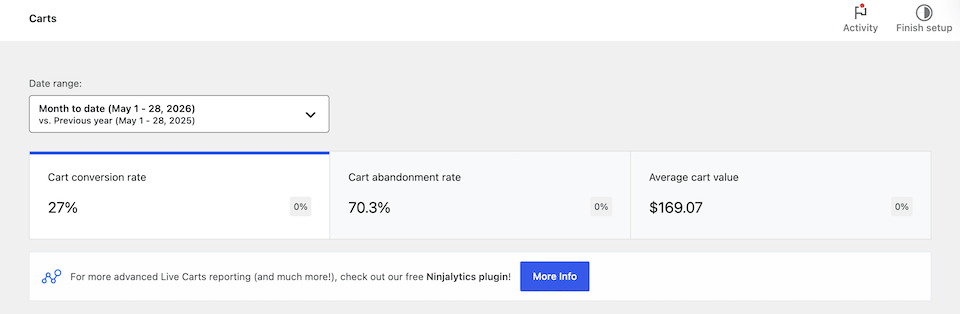
Under Analytics > Carts, you get cart conversion rate, cart abandonment rate, and average cart value, with date filtering. It uses the standard WooCommerce analytics interface, so there is nothing new to learn.
Need deeper insights? Pair Live Carts with Ninjalytics (free and pro) to add custom segments, data ranges, trend charts, and CSV export to your cart data.
A few other useful details
Cart data is stored in custom database tables to avoid cluttering the default WordPress tables. Older carts are archived automatically. A built-in Status & Diagnostics page shows health checks for WordPress, PHP, WooCommerce, database tables, migration status, and cron schedule. There is also a debug log with configurable log levels.
Common Use Cases
- Looking up a customer cart during a support conversation using a cart ID.
- Checking active carts on a busy day to see which products are getting the most attention.
- Reviewing abandoned carts to identify common drop-off points.
- Reporting on conversion rate, abandonment rate, and average cart value over time.
- Editing a cart on behalf of a customer when something goes wrong (Pro).
- Sending a recovery URL so a customer can return and resume where they left off (Pro).
- Turning a cart into an order with a single click for phone or B2B orders (Pro).
Who Is This For?
Live Carts is useful in many everyday store management situations, including:
- Stores with active customer support – help customers in seconds using their cart ID.
- Stores with high abandonment rates – measure the problem before trying to fix it. Focus on the highest-value carts.
- Stores running promotions – see in real time which promo codes actually land in carts.
- Stores with multiple support or sales agents – give everyone a shared, live view of what is happening on the storefront.
- B2B and phone-order stores – build a cart with a customer and convert it directly to an order (Pro).
- Stores behind Cloudflare or other proxies – get accurate IP attribution out of the box (Pro).
Take It Further with Live Carts Pro
The free version covers most use cases. Live Carts Pro gives you more control and lets you act on what you see.
Highlights include:
- Edit cart contents from the admin – add, remove, or update products and quantities directly in the backend.
- Generate cart recovery URLs – secure one-click links you can send to customers to restore their cart.
- Convert a cart to an order with one click – ideal for phone orders, B2B requests, or quick recovery cases.
- Advanced cart filters – filter by product, customer, IP address, or cart value.
- Add coupon codes from the admin cart page.
- Custom abandoned cart timing – configure exactly when carts are marked abandoned and when they are archived.
- Automated recovery emails – coming soon.
It’s designed for stores where cart visibility is not enough – where you need to take action quickly and give your support and sales teams the right tools to do it.
Learn more about Live Carts Pro
Get Started
Real-time cart tracking does not just help you understand your store – it helps you act on what is happening, recover more sales, and give your customers faster support. With Live Carts for WooCommerce, you can finally see what was happening all along.
We would love to hear how you are using Live Carts in your WooCommerce store. What features do you find most useful, and what is still missing for your ideal workflow?
Download the free version on WordPress.org
Running a WooCommerce store? Join the BerryPress community on Facebook to share ideas and stay up to date, or subscribe to the newsletter for plugin updates straight to your inbox.