If you have ever managed a WooCommerce store with more than a handful of products, you know how quickly things can get messy. Keeping your catalog organized takes time – and it is easy for categories to fall out of date as new products are added, tags change, or stock levels fluctuate.
Automatic categorization solves that. It keeps your store organized behind the scenes, saving hours of manual work while improving your customers’ experience.
Why Automatic Categorization Matters
Want to boost your store usability without a lot of effort? Automatic categorization helps you organize your WooCommerce products efficiently, making it easier for customers to navigate – and more likely that they will stay and convert.
Improved customer experience
One of the biggest reasons behind the popularity of online shopping is simple: people want to save time. Studies show that if visitors cannot find what they are looking for within a minute, they leave.
Well-structured product categories help them get there faster – keeping them engaged, satisfied, and ready to buy.
Fewer errors and better inventory control
Automatic categorization also means fewer mistakes and a more reliable workflow.
When your categories are rule-based instead of manually assigned, you eliminate data entry errors and maintain consistent organization even with a large team.
It also becomes easier to monitor stock levels and identify which products move slowly – helping you make better inventory decisions.
Why We Built It
This plugin was created during a client project where we managed a large WooCommerce store with constantly changing inventory. Every small update – a new product, a restock, a seasonal sale – meant manually reassigning categories. We realized there was no reliable way to automate this process, so we built one.
Since then, it has become clear that many store owners face the same challenge. The Automatic Product Categories for WooCommerce plugin was designed to remove repetitive work, keep categories up to date, and eliminate human error.
Common Use Cases
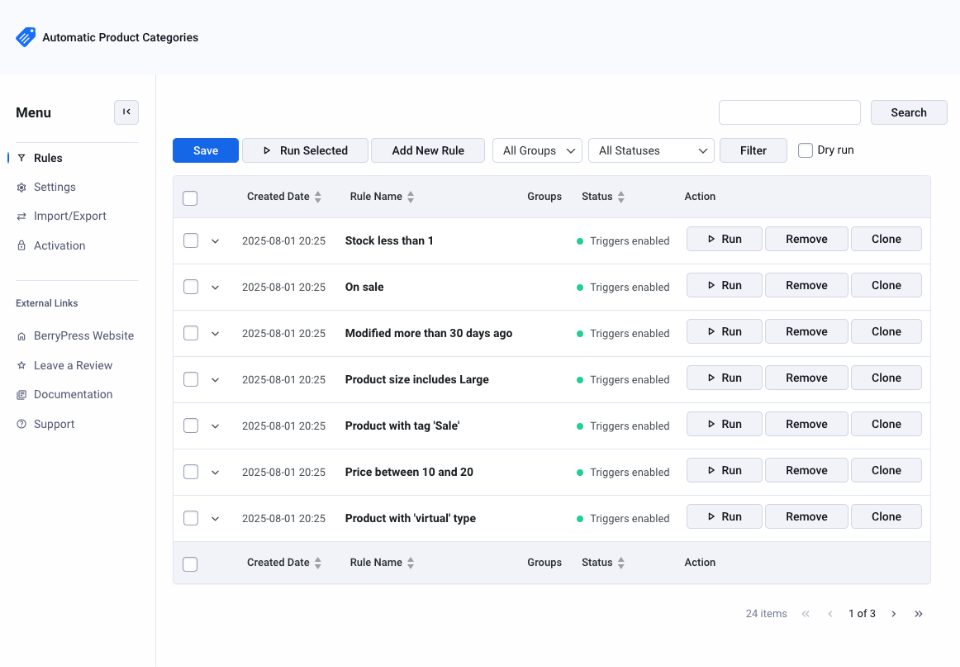
- Reorganizing after imports or migrations – Automatically assign products to the right categories when you are cleaning up or standardizing a large catalog.
- Assigning child to parent categories – For example, when a product is added to “Running Shoes”, it can automatically be added to “Shoes” as well.
- Stock or sales-based organization – Move out-of-stock products into a hidden or “Sold Out” category, or automatically feature your best sellers based on total sales.
- Highlight new or updated items – Create a “New Arrivals” or “Recently Updated” category using days since created or days since modified conditions.
- Dynamic front-end sections – Display “Best Sellers”, “New Arrivals”, or “Sale” products automatically by using categories or tags in your product blocks.
- Seasonal and promotional updates – Move products in and out of categories like “Winter Collection” or “Holiday Gifts” based on tags, attributes, or timing.
- Simplified workflows – Define rules once, and the plugin will handle the rest. No need to remember which tags, attributes, or conditions belong to each category.
How It Works
1. Create your own rules
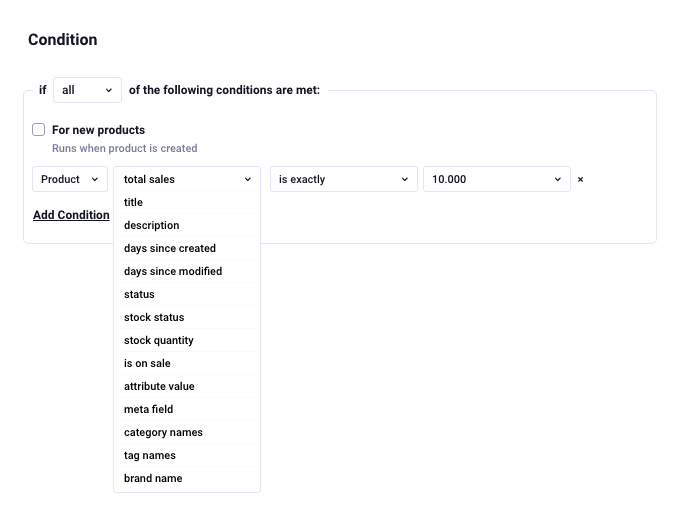
Set up conditions like “if title contains Summer”, “if stock is below 5”, or “if tag equals Organic”.
Use advanced options such as meta fields, total sales, or days since created or modified – perfect for highlighting new arrivals, best sellers, or recently updated products.
2. Define what happens next
Each rule includes an Action that defines what to do when a condition is met or not met – for example:
- Add to category
- Remove from category
- Add tag
- Remove tag
- Add taxonomy – coming soon
- Remove taxonomy – coming soon
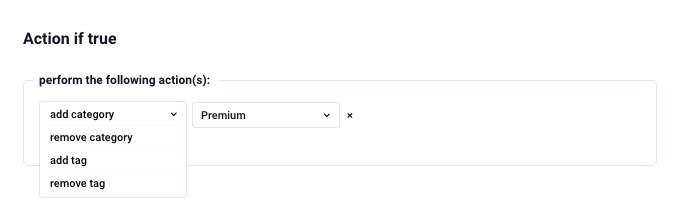
If a product no longer meets the condition, the plugin can automatically undo the action, keeping your store structure clean and accurate.
3. Choose when rules run
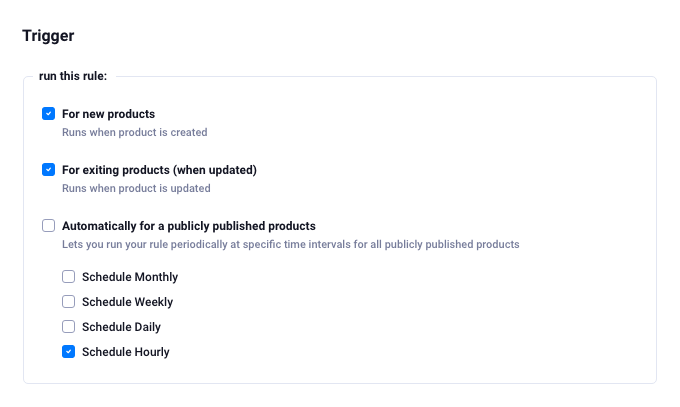
You decide how automation fits into your workflow by choosing rule Triggers. You can also run rules manually.
Flexible Rule Triggers
- For new products – Automatically runs when a new product is created, keeping new listings instantly categorized.
- For existing products (on update) – Triggers whenever a product is edited or updated, so your categories always stay current.
- For publicly published products – Run rules periodically at specific time intervals for all published products – ideal for ongoing maintenance or scheduled cleanup.
- Manual and scheduled runs – Execute single rules manually, run all rules in bulk, or schedule daily automatic runs for complete hands-off organization.
Perfect For
Automatic categorization can be applied in many everyday store management tasks. Below are a few typical ways it can be used in WooCommerce stores:
- Stores with large or fast-changing catalogs – keep hundreds or thousands of products categorized properly, even during imports or bulk updates.
- Teams with multiple managers or workflows – ensure consistency across your entire catalog without relying on everyone to remember manual steps.
- Dynamic inventory and pricing – reflect real-time stock and pricing changes automatically in your store structure.
- Marketing and seasonal updates – keep your promotional categories up to date without editing them manually every week.
- Smart front-end layouts – power product sections and landing pages dynamically using category- or tag-based logic.
Take It Further with the Pro Version
While the free version covers most use cases, Automatic Product Categories Pro gives you even more flexibility and control.
The Pro version lets you:
- Run dry tests before applying rules – preview all changes without affecting live data.
- Use advanced rule combinations based on multiple conditions and logic (AND / OR) – coming soon.
- Use additional options to schedule rule runs.
- Access more filtering and search options.
- Use custom Taxonomies in conditions.
- Group rules.
- Clone rules with one click.
It is designed for stores that handle large catalogs or complex categorization needs – where reliability, safety, and precision really matter. Learn more about Automatic Product Categories for WooCommerce Pro
The Bottom Line
Automatic categorization does not just save time – it helps your store stay consistent, relevant, and scalable.
With Automatic Product Categories for WooCommerce, your catalog can now organize itself – so you can focus on what actually grows your business.
We’d love to hear how you’re using automatic categorization in your WooCommerce store. What features do you find most useful, and what’s still missing for your ideal workflow?
Get Started
Download the free version plugin on WordPress.org
Learn more about Automatic Product Categories for WooCommerce Pro