
PhotoBerry Studio

CHOOSE A PLAN
Sale!Free
- Access to free features
- Access to product updates and improvements
- Standard support
Single Site
- Access to all premium features
- Use on 1 website
- 1 year of updates
- 1 year customer support
- Priority support
- Cancel subscription anytime
Unlimited Sites
- Access to all premium features
- Use on unlimited websites
- 1 year of updates
- 1 year customer support
- Priority support
- Cancel subscription anytime
Streamline Client Proofing from Upload to Approval
PhotoBerry Studio helps photographers present beautiful galleries, collect client feedback, and manage approvals — all inside WordPress. Protect your images with watermarks, guide clients with suggested images, and keep projects moving with a clear selection workflow.
Client Proofing & Feedback
Collect client selections, favorites, and comments directly within beautiful galleries — streamlining approvals and eliminating endless back-and-forth emails.
Watermarking & Access Control
Protect your work with customizable watermarking and flexible access options, including public links, password protection, or secure client logins.
Sessions & Galleries Management
Keep your workflow organized by grouping images by session, event, or client. Track selections, feedback, and final approvals all in one place.
Public Event Galleries & Guest Uploads
Engage guests with public galleries that accept photo uploads from just about any device — perfect for weddings, events, or brand activations.
Multiple Gallery Layouts & Lightbox
Showcase your photography with elegant, responsive gallery layouts (grid, cropped grid, masonry) and a clean, distraction-free lightbox viewer.
Cloud Storage & Delivery Tools
Store your photos securely in the cloud and deliver approved selections automatically in both web and print-ready formats.
Advanced File & Session Management
Work with professional formats like RAW, manage multi-client sessions, and deliver approved images in web and print-ready files - all from one streamlined workspace.
Notifications & Email Templates
Keep both clients and admins informed with built-in notifications and status updates that simplify communication, approvals, and delivery.
Create Beautiful Image Galleries
Design professional photo galleries — public or private — to showcase your portfolio or event highlights. PhotoBerry Studio gives you precise control over layout, organization, and presentation to keep your collections clean, consistent, and engaging. Easily embed galleries anywhere using a shortcode or a Gutenberg block (coming soon!)

Grid
Display images in clean, responsive grids.

Cropped Grid
Keep perfect proportions for a uniform look.

Masonry
Showcase different photo dimensions without cropping
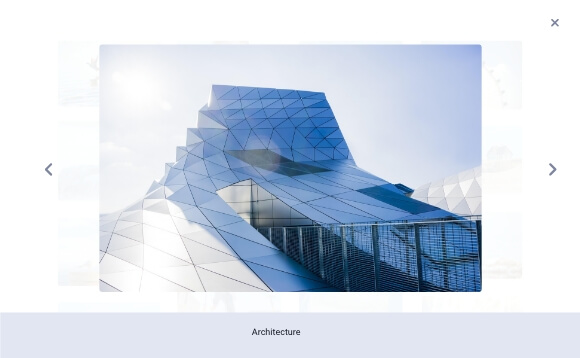
Lightbox View
Open photos in an elegant fullscreen view with a slider.
Secure Client Sessions — Streamlined Presentation, Review, Selection, and Delivery
Provide a personalized experience for each client through secure, private sessions.

Share sessions with individual or multiple clients, giving them proofing tools to review, comment, and select their favorite images. Keep your workflow efficient and communication clear with a client experience designed for collaboration.
- Organize sessions by client, event or project (title, date, type)
- Clients mark favorites, leave comments, submit final selections
- Flexible download options in multiple formats — PNG, JPG, WebP
- Deliver optimized images for print or web with adjustable quality, dimensions, and resolution.
- Customize session layouts, status tracking and archive workflows
From First Preview to Final Delivery
Schedule Session
Upload & Organize
Proofing & Client Review
Approvals & Revisions
Image Delivery
Archive & Close
Share Easily and Securely — Controlled Access Without the Complexity
Flexible sharing options for both galleries and sessions — from public access to secure, private delivery.
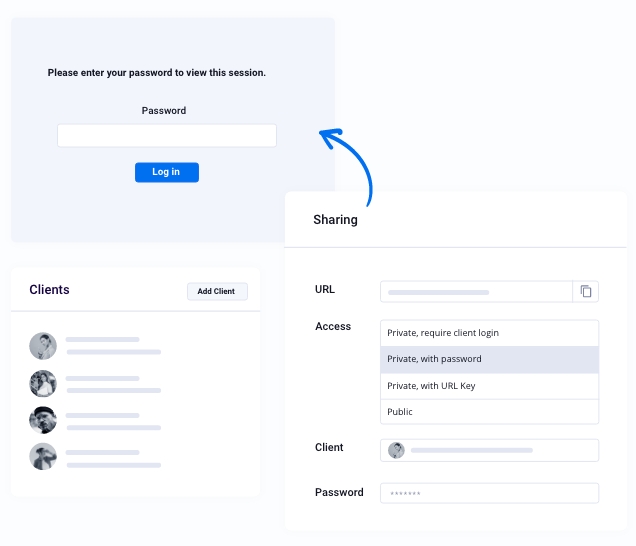
Public Galleries
Accessible to anyone with the link - perfect for public portfolios, event highlights, or promotional showcases where open visibility matters.
URL Key Sharing
Share quick links with embedded security keys for easy, limited-access sharing - ideal for media previews, press galleries, or short-term collaborations.
Password-Protected Sharing
Provide controlled access through password protection. Great for family collections, team projects, or group events.
Private Sharing with Client Login
Grant access only to assigned clients through secure logins and authenticated sessions - perfect for private proofing, commissioned work, or exclusive client deliveries.
Easily Collect Photos From Every Guest or ClientPRO
Let anyone upload photos directly to your gallery — perfect for events, weddings, team projects, or client collaborations.
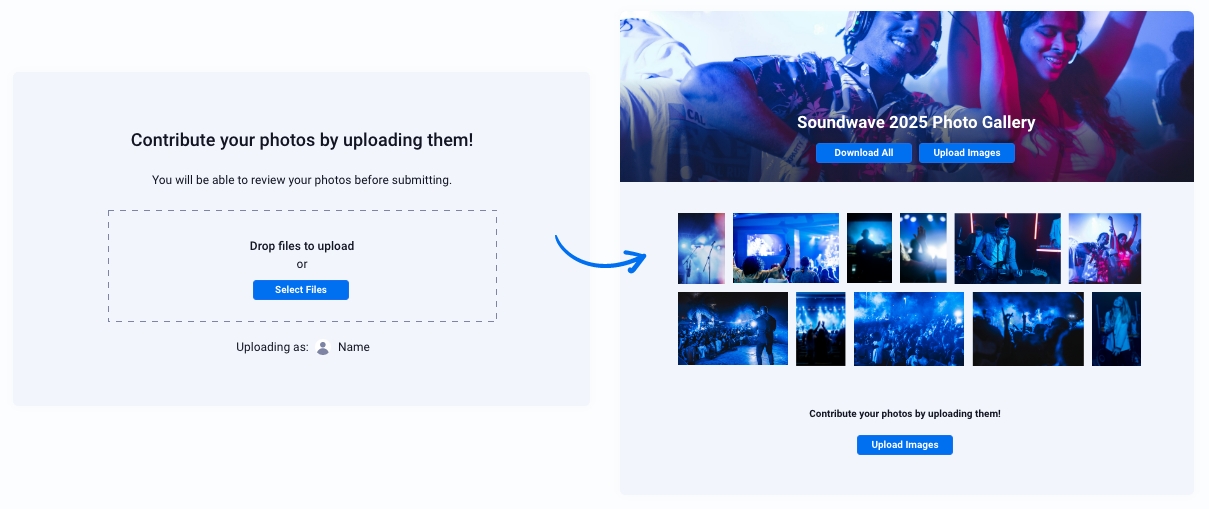
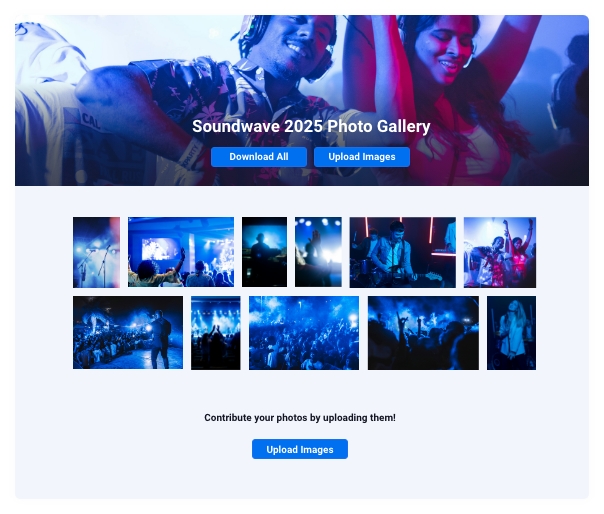
- Optionally approve images before they show in the gallery
- User can review images before submitting
- Allow downloads
- Allow comments
- Feature images
- Allow guests to contribute
- Get notified when images are added
Powerful Features for Photographers
PhotoBerry Studio empowers photographers with versatile tools to streamline their workflow, enhance client collaboration, and protect their work.

Custom Watermarks PRO
Apply customizable watermarks to protect your images from unauthorized use

Image Comments
Enable clients to leave feedback directly on individual images. Admins are notified in the dashboard and by email.

Mark Images as Favorites
Allow visitors to bookmark their favorite photos
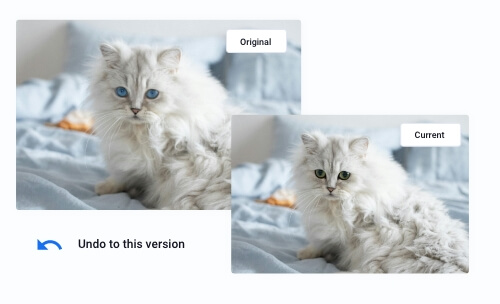
Image Revisions
Track changes by uploading multiple versions of an image
- Suggest Images to Client
- RAW Format Support
- Web and Print Ready Files
- Multiclient support
- Suggest images to clients
- Limit the number of photos a client can select during proofing
- Review and approve client uploads to ensure only selected images go live
- Receive admin alerts for client activity — comments, selections, approvals, and uploads
- Organize sessions and galleries with custom labels
- Create and organize client accounts with all their details directly in the PhotoBerry Studio interface
- Customize all frontend text strings — no extra plugin needed
- Custom images sorting
- Customizable email templates for communication.
- Customizable email templates for communication
- ...and more!
PhotoBerry Cloud Storage PRO
Keep your WordPress site fast, light, and responsive — with flexible image storage options.
You can choose to store images locally (self-hosted) or use PhotoBerry Cloud Storage to securely offload them to the cloud.
PhotoBerry Cloud Storage automatically offloads all uploaded images to a connected cloud service, improving performance and reducing hosting load — perfect for growing portfolios, high-volume projects, or multi-client environments.
- Start with 7 GB in the Pro plan — add more when you need it
- Offload image files to cloud storage for optimal performance
- Reduce server load, lower hosting costs, and keep your site running smoothly
- Deliver images faster with CDN support
- Ideal for high-resolution galleries, large projects, and client sessions
- Allow guests to contribute
- Secure, reliable, and scalable solution
Only logged in customers who have purchased this product may leave a review.
Log inComparison: Free vs Pro
The Free version gives you the essentials for secure client proofing.
The Pro version unlocks advanced delivery, event galleries, storage and collaboration.
| Feature | Pro Version | Free Version |
|---|---|---|
| Create galleries | Included | Included |
| Manage client sessions | Included | Included |
| Client favorites | Included | Included |
| Per-image comments | Included | Included |
| Multiple layouts (grid, cropped grid, masonry) | Included | Included |
| Lightbox viewing | Included | Included |
| Flexible access (public link, password, login) | Included | Included |
| Client downloads | Included | Included |
| Watermarking (standard) | Included | Included |
| Collect guest photos with direct uploads | Included | Included |
| Personalized watermarks | Included | Not included |
| Secure cloud storage | Included | Not included |
| Automated delivery (web & print ready) | Included | Not included |
| Public galleries with guest photo uploads | Included | Not included |
| Assign multiple clients to a session | Included | Not included |
| Customizable email templates | Included | Not included |
| RAW file uploads | Included | Not included |
| View Plans | Download Free |
Built for Photographers, Studios, Agencies, and Individuals
From solo wedding photographers to commercial studios and event hosts — PhotoBerry Studio fits a wide range of needs.
- Wedding Photographers
- Portrait & Lifestyle Studios
- Commercial & Branding Shoots
- Events, Parties & Conferences
- Fine Art & Portfolio Presenter
- Agencies & Multi-client Workflows
- Real Estate & Interior Photography
- Personal Portfolios & Projects
Frequently Asked Questions
How do clients select favorites and leave feedback?
Can I password‑protect or restrict gallery access?
Can clients submit their final selection from the frontend?
Can guests upload photos to a public gallery?
Does PhotoBerry Studio use the Media Library?
What’s included in Pro?
Resources & Support
Tags
photography, proofing, galleries, client feedback, watermarking, sessions
Reviews
There are no reviews yet.